Facet Browser
A Facets-style media library browser for 64-bit foobar2000 2.x, with dark mode.
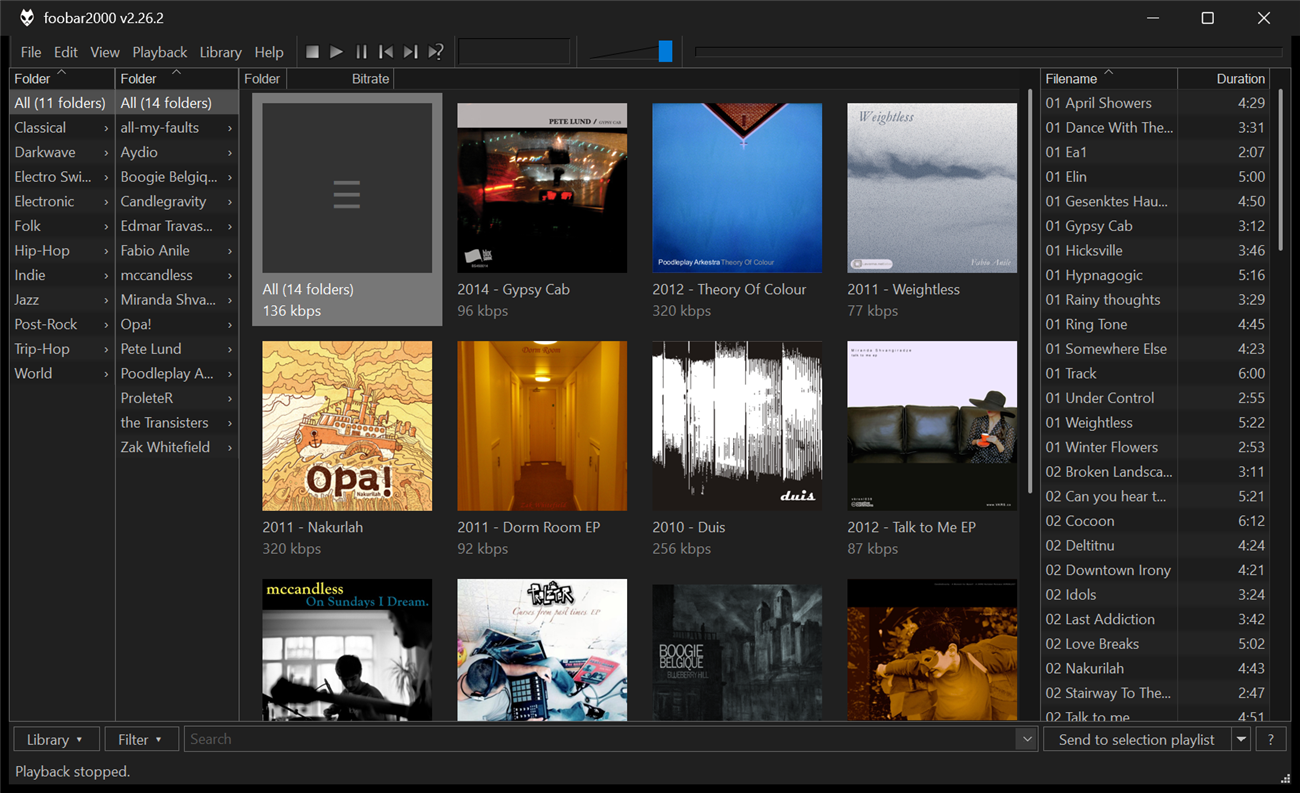
Music in the screenshot: Creative Commons albums from the Internet Archive (credits).
Facet Browser lets you browse your library in linked panes. Pick a genre in the first pane and the next pane shows only the artists in that genre. Pick an artist and the next pane shows only their albums. Then play the result, or send it to a playlist.
It works like Facets by Frank Bicking (2007–2011). Facets was only released for 32-bit foobar2000 and doesn’t support dark mode. Facet Browser runs natively in 64-bit foobar2000 and follows its dark mode and colour scheme. It is an independent reimplementation and contains no code from Facets.
Highlights
- Linked panes with multi-select and OR / AND logic
- Folder column to browse your folder tree, one level per pane
- Columns from title formatting, with multi-value tags split into separate entries
- 19 statistics such as duration, bitrate, play count, rating, size and dates, all sortable
- Album art grid with bottom, right or no labels
- Toolbar with source, saved filters, search with history, and a one-click action
- Send to playlists or autoplaylists, drag and drop, and the normal foobar2000 track menu
Where to start
| If you want to… | Read |
|---|---|
| Install the component | Installation |
| Learn the basics in five minutes | Getting started |
| Change what a pane shows | Panes |
| Understand the numbers | Statistics |
| Use search, filters and actions | Toolbar |
| Add your own columns and filters | Preferences |
| Copy a ready-made layout | Example layouts |
| Fix a problem | FAQ & troubleshooting |
Facet Browser is free software under the GNU GPL v3 or later.