Playlists
Build a folder tree of playlists from your tags, like a custom browser inside iTunes. For example, one playlist per album, in a folder per artist, in a folder per first letter:
Albums by Artist
├── A
│   └── ABBA
│       ├── Arrival (1976)
│       └── Waterloo (1974)
└── B
    └── The Beatles
        └── Abbey Road (1969)
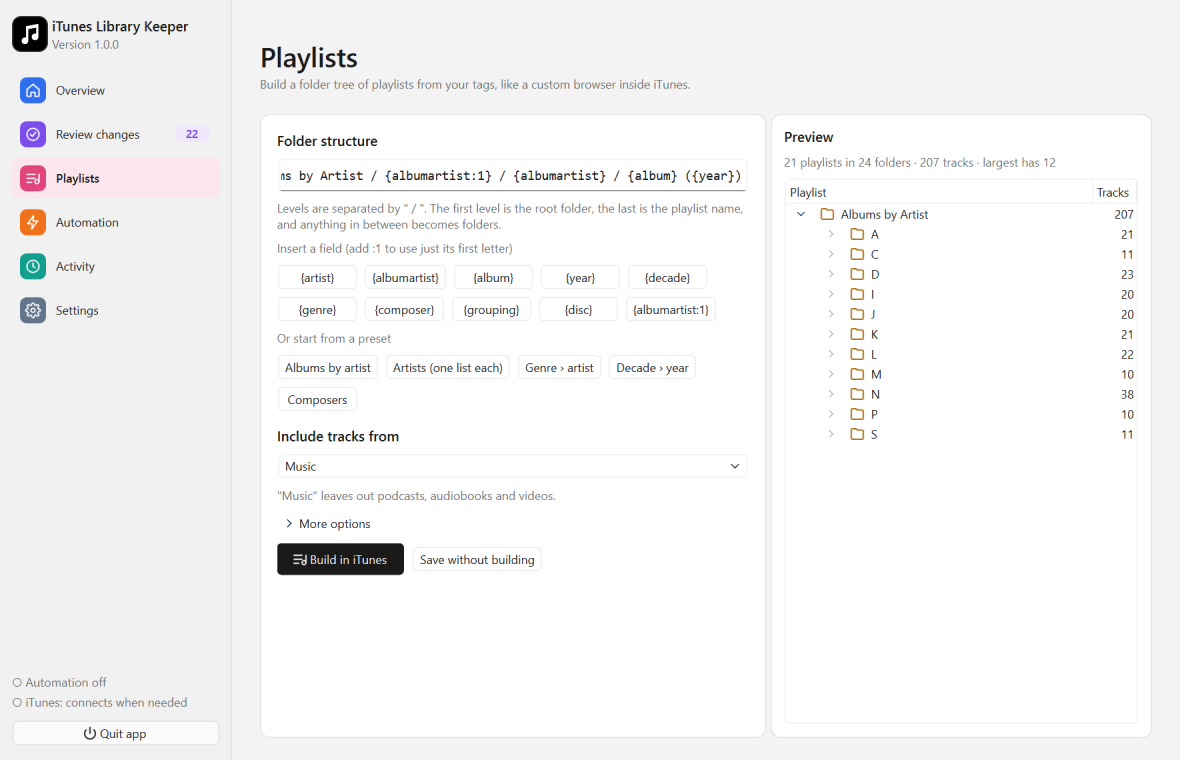
Folder structure
The Folder structure box holds a template. Levels are separated by /:
Albums by Artist / {albumartist:1} / {albumartist} / {album} ({year})
- The first level is the root folder. It’s plain text, without fields.
- The last level is the playlist name. It needs at least one field.
- Levels in between become folders.
Every track goes into the playlist its tags produce. The Preview on the right shows the whole tree, with track counts, before anything is built.
Fields
| Field | Value |
|---|---|
{artist} | Artist |
{albumartist} | Album artist; falls back to artist, and compilations use the compilation name |
{album} | Album |
{year} | Year |
{decade} | Decade, e.g. 1990s |
{genre} | Genre |
{composer} | Composer |
{grouping} | Grouping |
{disc} | Disc number, e.g. Disc 2 |
Add :1 to use only the first letter, e.g. {albumartist:1} gives B for Bob Dylan. Names that don’t start with a letter go under #. Accents are ignored, so Édith Piaf goes under E.
Use the Insert a field buttons to add a field at the cursor.
Empty brackets are dropped: an album without a year becomes Abbey Road, not Abbey Road ().
Presets
| Preset | Template |
|---|---|
| Albums by artist | Albums by Artist / {albumartist:1} / {albumartist} / {album} ({year}) |
| Artists (one list each) | Artists / {albumartist:1} / {albumartist} |
| Genre › artist | By Genre / {genre} / {albumartist} / {album} |
| Decade › year | By Year / {decade} / {year} / {albumartist} - {album} |
| Composers | Composers / {composer:1} / {composer} |
Options
- Include tracks from: a playlist such as Music (the default), or the Entire library. Using Music leaves out podcasts, audiobooks and videos.
- More options:
- Ignore “The”: The Beatles goes under B for
:1fields. - Name for compilations: used as album artist for compilation albums without one (default Various Artists).
- When a field is empty, use: a replacement for each field, for example Unknown Artist or (singles) for tracks without an album.
- Ignore “The”: The Beatles goes under B for
Tracks in each playlist are ordered by disc number, then track number, then title.
Build in iTunes
Click Build in iTunes. Or Save without building to keep the settings for later or for automation.
The app owns the root folder. Playlists and folders inside it that the template no longer produces are removed. Nothing outside the root folder is touched. Don’t keep your own playlists inside it.
- The first build of a large library can take a few minutes. You can keep using iTunes and cancel at any time.
- Building again only changes the differences: new playlists are added, changed ones updated and old ones removed. It reads the current tree from iTunes itself, so it never creates duplicates.
- To keep the tree up to date as your library changes, turn on Update playlists in Automation.
Examples
| Goal | Template |
|---|---|
| One playlist per genre | Genres / {genre} |
| Albums per decade | Decades / {decade} / {albumartist} - {album} ({year}) |
| Multi-disc albums split by disc | Discs / {albumartist} / {album} / {disc} |
| Groupings (e.g. moods you tag yourself) | Moods / {grouping} |